
Emails are still part of everyday business—like scissors for a hairdresser and a trowel for a bricklayer. That’s exactly why they’re a popular target for hackers. Unencrypted messages are like postcards: anyone who gains access along the way can read them. In this article, you’ll learn why email encryption is mission-critical—technically, legally, and commercially. We’ll show you how emails really work, where the weak spots are, and how to protect your company in practical terms.
Do you use email daily to communicate with customers, partners, or colleagues? You’re in good company—more than 300 billion emails are sent worldwide every day. What many forget: a significant share contains sensitive data—often unencrypted. And that’s a problem.
Unencrypted emails can be intercepted, manipulated, or misused with ease. At the same time, regulatory requirements like GDPR, NIS2 & more are rising. Protecting business communication isn’t optional—it’s a basic security requirement.
But how does an email actually work on a technical level? Who can read along in transit? And how do you finally gain real control over sending?
How does an email travel across the network — and where does it become vulnerable?
Emails are transmitted in several steps, and the connection between these hops is not always secured by default. Outdated or insecure protocols are often used if mail clients or servers are misconfigured. Here’s a brief overview of the most common email protocols, their standard ports, and typical encryption options:
| Protocol | Port | Encryption |
|---|---|---|
| SMTP (mail relay) | 25 | Cleartext; optional STARTTLS (opportunistic) |
| SMTPS (implicit) | 465 | TLS at connection start (implicit TLS) |
| POP3 | 110 | Cleartext; optional STARTTLS |
| POP3S (implicit) | 995 | TLS at connection start (implicit TLS) |
| IMAP | 143 | Cleartext; optional STARTTLS |
| IMAPS (implicit) | 993 | TLS at connection start (implicit TLS) |
Explanations of the encryption methods
- STARTTLS: Upgrades an initially unencrypted (cleartext) connection to an encrypted one (TLS) after negotiating via the protocol. Can fall back if the other side doesn’t support TLS.
- Implicit TLS: (also “SMTPS” or “POP3S/IMAPS”) starts the connection encrypted from the outset, without a prior cleartext phase.
🔒 Important: Encryption only happens if the correct ports and protocols are used. If a client uses the unencrypted variant (e.g., IMAP instead of IMAPS), the connection is vulnerable—even if the server supports TLS.
Before your message reaches the recipient, it passes three technical stages:
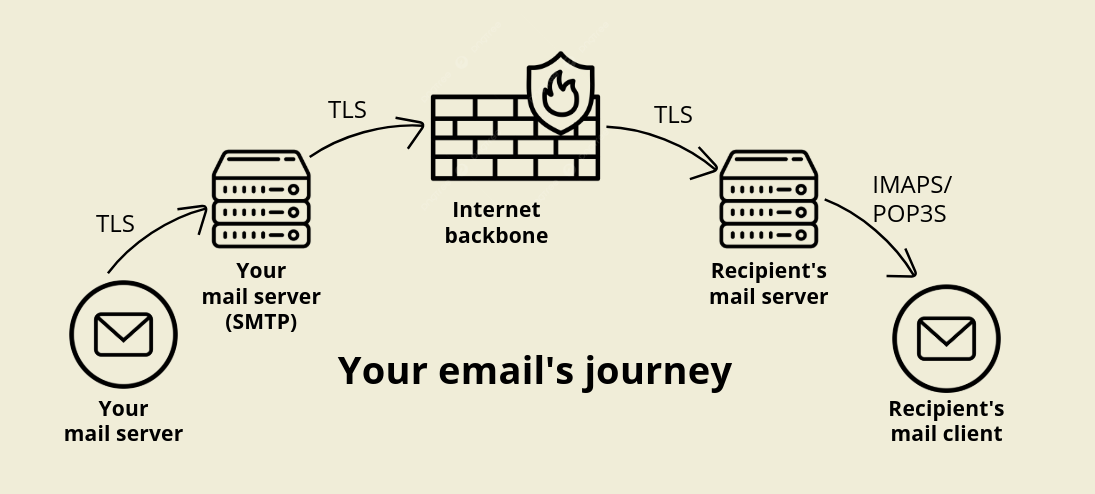
- From the mail app to the mail server (SMTP)
You click “Send” — and the mail is transmitted via SMTP to your provider’s mail server. Modern providers use STARTTLS or SMTPS to secure the connection. - From the outbound server to the destination server
Here the mail is relayed from server A to server B. This connection can also be encrypted with TLS (Transport Layer Security) — but note: this only protects the transport path, not the email content itself. - From the mail server into the inbox
If the recipient retrieves mail via IMAPS or POP3S, at least the last hop is encrypted. However, the content usually remains in cleartext on the destination server — unless end-to-end encryption is used.
📌 Conclusion: At best, transmission is somewhat protected — but the content often remains as open as a postcard.
Who can read your email — if you do nothing
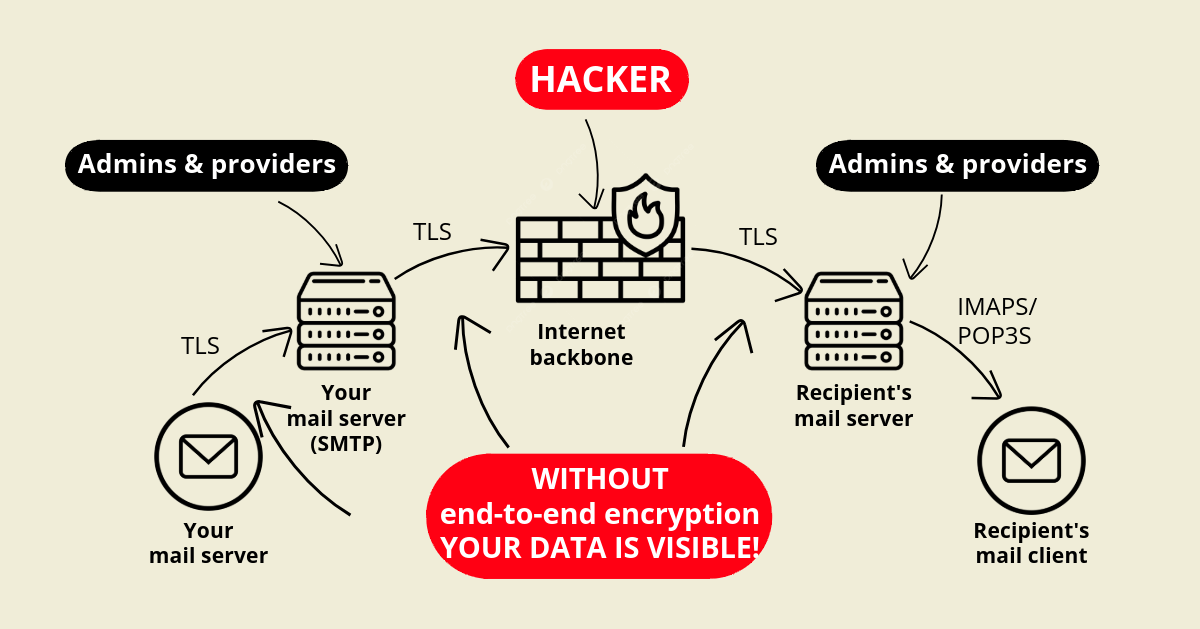
- Internet providers that route the traffic
- Mail server operators that store the emails
- Hackers who eavesdrop (man-in-the-middle)
- Intelligence services, depending on the legal framework
Why you should encrypt emails — right now
- Preserve confidentiality:
Contracts, quotes, strategies — none of this should float across the internet unprotected. - Meet GDPR & compliance requirements:
Personal data must be actively protected — or you risk fines and reputational damage. - Prevent industrial espionage:
In innovation-driven sectors, losing sensitive information can have severe consequences. - Avoid manipulation:
Digital signatures ensure integrity and prove the message truly comes from you.
When mailboxes are hacked — and what that means
💥 1. Your recipient’s mailbox gets hacked
Then encrypted transmission won’t help anymore. The attacker has access to all emails in the inbox — even to encrypted ZIPs if the password is included somewhere in cleartext.
And what does that mean for you as the sender? Simple: your confidential email — perhaps with sensitive quotes, contracts, or financial data — lands in a compromised mailbox. The attacker can read it, reuse it internally, or even sell it to third parties. Worse yet, they can use the conversation to impersonate you or leverage your message as a hook for further attacks — for example, by sending forged replies in the recipient’s name. You also become a victim — even though you did everything right.
💥 2. Your own mailbox is taken over
Even worse: attackers gain access to sent and received emails as well as saved drafts. They can build a detailed picture of internal workflows, projects, contacts, and responsibilities. In the worst case, the attacker uses the compromised mailbox to insert themselves into ongoing conversations, sabotage internal processes, or deceive others — for example through manipulated instructions, forged invoices, or fake payment details. It’s especially critical if private keys or password information are stored there — in that case, even the strongest encryption becomes ineffective.
What you must do to keep it from getting that far
- Use end-to-end encryption (S/MIME or PGP):
This keeps communication protected even if someone gains access to the mailbox.
- Enable two-factor authentication:
Your account remains protected even if the password falls into the wrong hands.
- Don’t send passwords by email or store them in the mailbox:
Especially for encrypted attachments: never include the password in the same message — use separate channels instead.
- Raise employee awareness:
Awareness training helps teams detect and report phishing faster.
- Run regular security checks:
Audits and penetration tests help identify weaknesses before an attacker does.
What should be encrypted?
The golden rule: anything confidential:
- Customer data, quotes, contracts
- Financial data, calculations
- Access data, accounts
- Project plans, roadmaps
- Executive-level communication
Conclusion: If you don’t encrypt, you’re playing with fire
Email encryption isn’t a nice-to-have — it’s essential. If you communicate unencrypted, you risk not only losing data but also losing trust — and that can be costly.
With the right encryption, 2FA, and a few clear rules, you make life much harder for attackers. Best of all: you protect not only your company — but also your customers.